Grade work in the Gradebook
Log assignments and scores for each child. The same scores feed the course averages and GPA on their transcript.
Step by step
-
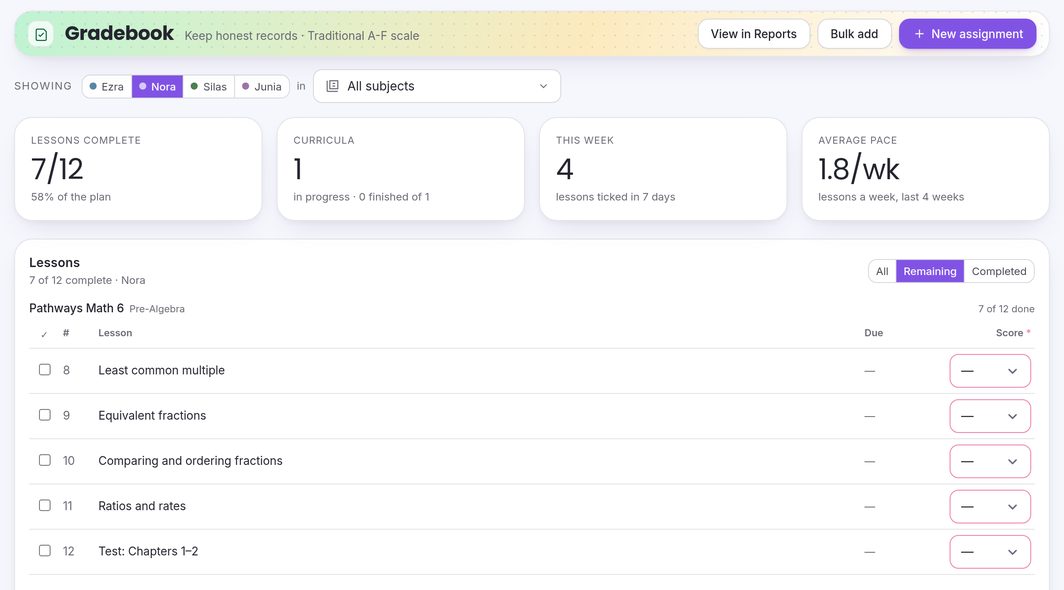
Open Gradebook and choose a child.
Gradebook is under Teach & Train in the sidebar. In the Showing row, pick a child, and a subject if you want to narrow the list.
-
Press “+ New assignment”.
Give it a Title, choose the Student and Subject, set the Date, and enter a Raw score from 0 to 100, or leave it blank to score it later.
-
Set its weight and press “Add assignment”.
Weight 1.0 is standard: make it bigger for tests and smaller for homework. Attach photos or scans of the finished work under Work attached if you like.
-
Score curriculum lessons as you go.
If the child is enrolled in a curriculum, its lessons appear in the Lessons card. Pick a Score from the list (100 down to 65, in fives), or Custom… to type any other, and the lesson is ticked off and logged as an assignment.
-
Entering a stack at once?
Bulk add takes up to 50 rows in one go. Click any row in the table to edit or delete it.
-
See the GPA.
Press View in Reports for GPA and course averages.
Common questions
Letter grades or mastery: where do I choose?
Per child, in Students → Edit profile → Grading mode: None — encouragement only, Mastery levels, or Traditional A–F + GPA. New students start on Mastery levels.
What grading scale do you use?
A 93, A− 90, B+ 87, B 83, B− 80, C+ 77, C 73, C− 70, D+ 67, D 63, D− 60, and F below 60. Anything from 60 up passes. Mastery levels default to Mastered 90, Proficient 80, Developing 70 and Emerging below that, and you can change them in Settings → Grading.
What does Weight do?
Averages are weighted by it: an assignment with weight 2.0 counts twice as much as one with 1.0.
Does the curve change the transcript?
No. The Curve slider (for Traditional A–F students) changes what you see in the Gradebook and Reports. The transcript uses the scores you entered.
Why do I have to enter a score to tick a lesson?
Children on Mastery levels or Traditional A–F are graded on scores. If you’d rather just tick lessons off, set their grading mode to None — encouragement only.
Where do I see GPA?
Press View in Reports at the top of the Gradebook.